
What is DNS and why name resolution exists .
First, let’s understand what DNS is. Then it will be easier to understand how DNS resolution works.
DNS (Domain Name System) gives a unique name to a website’s IP address. Every website has a unique IP address, but remembering IP addresses is very difficult for users.
That’s why DNS is used. It hides the IP address and provides an easy-to-remember domain name. When a user searches that domain name in a browser, the browser loads the website whose IP address is linked to that domain name.
Phonebook of Internet .
Just like we save phone numbers in our mobile under a person’s name (family, friends, or anyone else) because it is hard to remember numbers, computers also work in a similar way.
Every device on the internet is given an IP address to uniquely identify it. But an IP address is like a phone number—it is even more difficult to remember.
DNS Resolution work .
DNS resolution is the process of converting a website name into an IP address so that your browser can find the correct server on the internet.
This is a long process, so let’s understand it step by step.
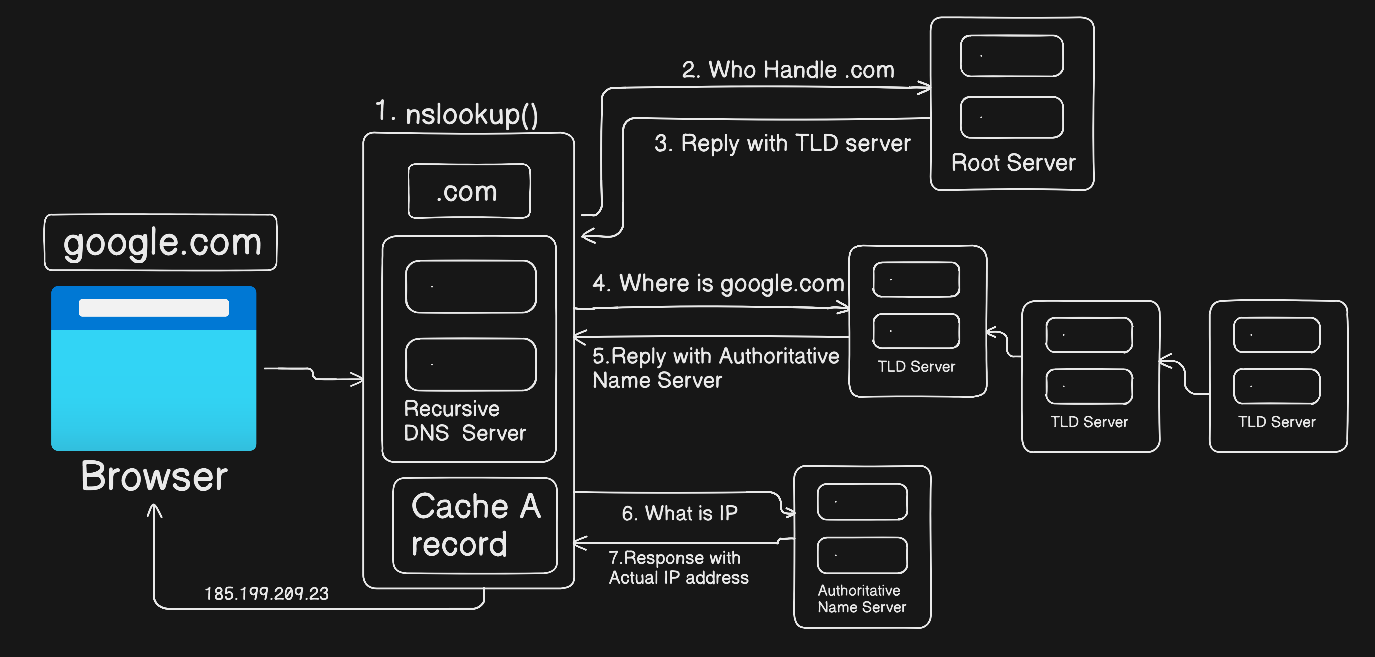
IP Address for your website. I wrote steps and giving a name in a sequence.
DNS important key terms .
De-Centralized :- DNS does not depend on one single computer or server to work. DNS is spread across many servers all over the world.
Delegation :- Handing over the responsibility of a domain (or subdomain) to another DNS server.
Loose Coupling :- Each DNS level works independently and does not depend on internal details of other DNS servers.
What is dig command and when it use .
digstands for Domain Information Groper. It is used to ask DNS questions and see the answers clearly in your where you are put that command .Obviously this command is used by a developer or programmer , A normal user usually does not know about this command. Even if they know, they do not really need to use it. Below, I have explained a few steps that show why the
digcommand is used.
This command is basically used in the Mac or Linux terminal when a user wants to get information about a domain name.
For example, it can be used to find the A record, check which DNS server the domain is using, see how many name servers are there, find the CNAME record, and understand how DNS works.
It also helps to know where the main DNS servers are, which IP addresses they use, and how different name servers are connected to each other.
dig https://google.com +short

- This dig command to look up the "A" record for the domain name `Google`.
- Return give back a IP address of `google.com` `142.250.193.142`.

Understand dig . NS and Root name server .
The
digcommand is used to search for a domain.The dot (
.) refers to the root server, which means the query first goes to the root server.The root server then helps find the name server for the domain.
A name server works like a nickname system — it checks which IP address the domain is connected to.
The job of
Root Serveris only that the first find your TLD domain in our server like {.com,.org} , means all Top level domain.There are total 13 root server from
A - M.
- Nameserver :- A Nameserver is a type of DNS Server. It is the server that store all DNS Record for a Domain, including
A Record,MX Record, orCNAME.
Understanding dig com NS with TLD Nameserver .
digcommand is for finding a in-depth information about your givenURL.TLD :- It is a
Top level Domainlike {.com,.net,.org,.in,.edu}. Hope you understand .So understand first why all DNS server find your TLD , because the reason is that
TLDknow where is you actualIP Addressstore mean yourA Recordof your site . They don’t know your IP but they know who manage name-server manage your IP address.Basically Authoritative name server where is store your request domain name
IP Address.Once they IP got from
Authoritative name serverthey job done , then they go back toDNS Resolvergive him toIP Addressand the DNS Resolver return that IP Address toBrowser, and then the last step your request website load all web pages.
Understanding dig google.com NS and Authoritative name-server .
When you are run this command dig google.com ns they give back you list of how many nameserver configure to your main Domain name { In Simple you can also say how many nickname have you main Domain name } .
When you type this command in terminal
dig google.com nsThey give back you output which name server is responsible for my google.com domain.
 google.com.             125053  IN      NS      ns2.google.com.
 google.com.             125053  IN      NS      ns3.google.com.
 google.com.             125053  IN      NS      ns1.google.com.
 google.com.             125053  IN      NS      ns4.google.com.
125053 :- It is a TTL {
Time to live} means how much long time for yourDNS IP Addressstore in cache .In :- Internet class
Ns :- Nameserver record type.
ns2.google.com. :- the nameserver for google.com
Understanding dig google.com and the full DNS resolution flow.
This command
dig google.comis only used for when we want a directA recordof the domain name . Because A record is the main IP Address of the website .Now if you want to find it in the terminal with the help of dig command , you just type a …
dig google.comAnd then you got a
A Recordof your request URL.google.com. 110 IN A 142.250.194.238 Query time: 194 msec SERVER: 10.255.255.254#53(10.255.255.254) (UDP) WHEN: Tue Jan 27 13:57:03 UTC 2026 MSG SIZE rcvd: 55
The Full DNS Resolution flow .
At the first you put the URL in the browser input field , Browser needs an IP address to connect to the server. So here the DNS resolution flow start.
They first check in cache if i know about it your IP address or not , if they got IP in the cache they return back and load you website , if the IP address not found the here the flow start .
They go to then DNS Resolver . And at the first check your TLD into the
Root Serverbecause they know about where you all nameserver store give Domain name .Root Server sent back the response with TLD server . Then it check the nameserver and figure who is the
Authoritative Nameserver, because all theA Recordstore there , it is manage byISP{Internet Service Provider.DNS Resolver now got who is the
Authoritative nameservernow they ask for IP Address.Authoritative nameserver give back the
IP Addressto the DNS Resolver .Now DNS Resolver got the
A RecordorIP Addressthey sent Response to back browser withIP Address.Then the final step is that browser have a IP Address know they load you website .
So this is the whole process how you DNS Resolution flow work.
means how DNS resolution work } . Hope you will understand


